
For founders, operations leaders, and IT managers in growing companies, the hardest part of scaling is that yesterday’s “good enough” systems can’t keep up with tomorrow’s pace. As teams expand and workflows multiply, IT system complexity rises fast, and business technology needs shift before plans can catch up. The result is familiar: tools that don’t connect cleanly, processes that strain under load, and new expectations for enterprise IT scalability that were never part of the original setup. A clear approach to scalable IT infrastructure turns business growth challenges into decisions that stay stable under pressure.
Understanding Scalable IT Architecture Basics
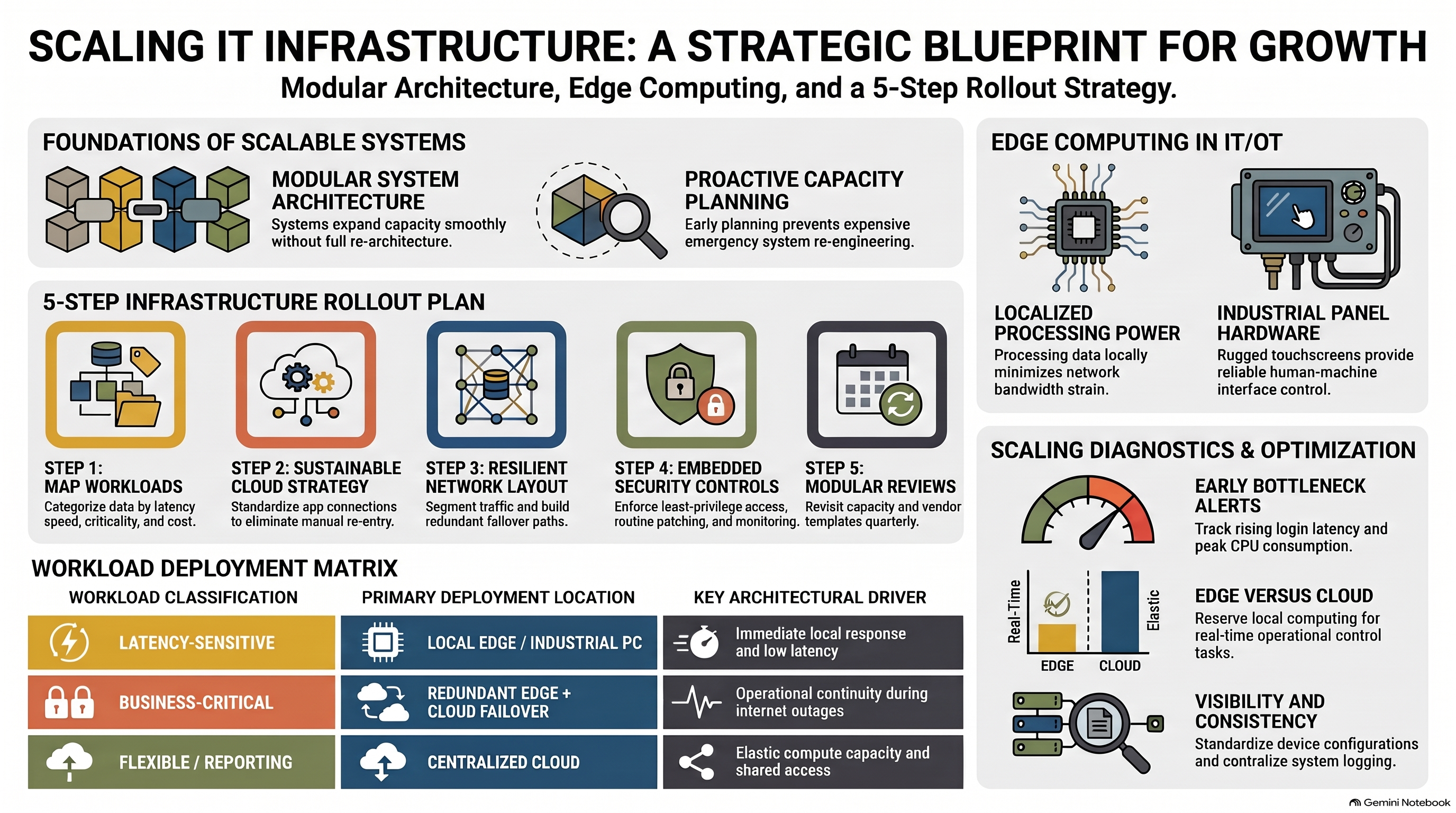
Scalable systems are designed to grow without forcing a full rebuild. A practical starting point is IT infrastructure scalability, meaning your setup can increase or decrease performance, capacity, and cost as demand changes. That foundation comes from modular building blocks, clear separation of responsibilities, and room to adjust as priorities shift.
This matters because buying tools before you plan the shape of your system often locks in future pain. When you do basic capacity planning early, you can add users, locations, and workloads with fewer surprises. You also avoid paying twice, once for a quick fix and again for the rework.
Think of it like outfitting a growing kitchen. Modular stations, separate storage, and a plan for peak dinner rush let you expand service without redesigning the whole layout. That same planning lens clarifies where edge computing belongs and what hardware choices support fast local decisions.
Put Edge Computing to Work in IT/OT: A Practical Hardware Example
Once you understand the basics of scalable architecture, the next win is deciding where data should be processed so performance stays snappy as systems expand. In a distributed IT/OT setup, edge computers handle processing and analytics closer to the machines and sensors generating the data. By analyzing information locally, you reduce latency and avoid pushing every data point back across the network, which helps limit bandwidth strain as your business grows, without sacrificing fast, responsive operation on the shop floor.
On the hardware side, look for industrial automation devices built to live where the work happens. The Tacton industrial panel PC is an example of a panel PC line that pairs industrial-grade computing with an integrated touchscreen for an all-in-one human-machine interface. Designed for manufacturing, automation, and machine control environments, it supports durable performance and simpler installation. With a rugged design and flexible configuration options, it can function as a rugged panel computer with durable performance in demanding industrial workflows.
Turn Scalable Infrastructure Principles Into a Rollout Plan
Your goal is to grow performance and reliability without constantly rebuilding your systems. This process helps you map what runs at the edge, what belongs in the cloud, and how to keep everything secure and resilient as your business adds new sites, users, and devices.
- Step 1: Map workloads by speed, risk, and cost
Start with a simple inventory: what data you collect, where it’s generated, and how quickly someone needs an answer. Tag each workload as latency-sensitive (needs local response), business-critical (cannot go down), or flexible (can run remotely). This gives you a practical basis for deciding what stays close to operations and what can be centralized. - Step 2: Choose a cloud integration strategy you can sustain
Pick a small set of systems that must share data cleanly, like production metrics flowing into reporting, maintenance, or ERP. Treat integration as connecting software applications so teams are not stuck doing manual exports, re-entry, or one-off fixes. Start with the minimum connections you need, then standardize how new apps plug in. - Step 3: Design a resilient network layout for growth
Separate traffic by purpose, such as operations, office, and guest access, so problems in one area do not ripple everywhere. Build in redundancy where downtime is expensive by using backup links, failover paths, and clear rules for what happens when connectivity drops. Document the “happy path” and the “failure path” so expansions follow the same blueprint. - Step 4: Bake cybersecurity into every deployment step
Establish baseline protections that are easy to repeat: strong access control, routine patching, and continuous monitoring for unusual activity. Limit who and what can talk to critical systems using least-privilege permissions and simple network boundaries. When security is part of your rollout checklist, upgrades stop feeling like risky one-time events. - Step 5: Future-proof with modular standards and regular reviews
Avoid locking growth behind a single vendor or custom configuration by using repeatable templates, versioned configurations, and documented interfaces. Plan quarterly check-ins to revisit capacity, integration needs, and failure lessons, then update your standard build accordingly. Choose roadmaps that align with flexibility, scalability, and operational efficiency so your infrastructure can evolve with demand.
Scalable IT Infrastructure Questions People Ask
Q: What does “scalable infrastructure” actually mean for a growing business?
A: It means your systems can handle more users, devices, and data without slowdowns or constant redesign. The capacity of a software system should increase smoothly as demand rises. Start by defining what “good performance” looks like, then measure against it monthly.
Q: How can I spot a scaling bottleneck before it becomes an outage?
A: Watch for early symptoms like rising login times, frequent Wi-Fi drops, saturated internet links, and databases hitting high CPU during normal hours. Set alerts for latency, packet loss, storage growth, and backup failures so you catch trends, not surprises. A simple weekly review of dashboards and tickets is often enough.
Q: Should we move everything to the cloud to scale faster?
A: Not always. Keep workloads local when they need instant response, must keep running during internet issues, or involve sensitive operational control. Use cloud services where elasticity and centralized access create clear wins.
Q: Can stronger security slow down growth or performance?
A: Good security usually speeds growth because it reduces fire drills and risky one-off exceptions. Since many teams still fail to assess the security of new tools before rollout, standardizing access, patching, and monitoring protects you without adding chaos.
Q: When troubleshooting gets harder as we grow, what should we fix first?
A: Start with visibility and consistency: standard device configs, clear network segmentation, centralized logging, and a single source of truth for IPs and assets. Then simplify by removing unused apps, duplicate integrations, and “temporary” rules that became permanent.
Turn Infrastructure Priorities Into a 90-Day Growth Roadmap
Scaling a business often means outgrowing the IT infrastructure that once “worked fine,” and the scramble to fix issues can steal focus from growth. The steadier path is a growth-oriented technology strategy built on clear standards, intentional capacity planning, and long-term IT planning that treats reliability and security as shared, ongoing responsibilities. When that mindset guides decisions, the IT infrastructure summary becomes a living plan: fewer surprise outages, smoother future technology adoption, and stronger business IT confidence across teams. Build infrastructure like a roadmap, not a patchwork.




Leave a Comment