
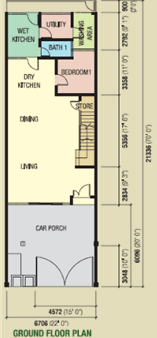
 On the left is a 2D floor plan of a house.
From the floor plan, we can easily spot the living room, the dining room, the dry and wet kitchen, a bedroom, a bathroom, a utility room, and a washing area.
Most housing developers would create a plastic model of the house for buyers to look at from an aerial view.
Another advanced method would be to create a 3D model that allows the buyer to look into the house from a first-person perspective.
This sort of view is as close as being in an actual show house without physically being there.
A friend once asked if I knew of any free software that could help him convert a 2D floor plan into a 3D walkthrough model.
He basically wanted the ability to plan and furnish his new home via the software.
Since the house will be empty, to begin with, the software will help by allowing him to place the furniture according to the actual layout of his home.
I tried to search for such a tool and found this one called Sweet Home 3D – a free interior design tool that helps you place furniture on a 2D house floor plan, with a 3D preview.
I gave the application a try according to the floor plan above, and this is the outcome of it.
3D View of the Dry Kitchen
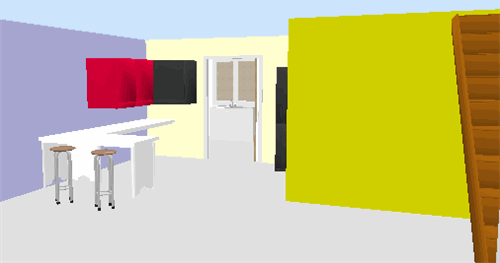
3D View of the Living Room
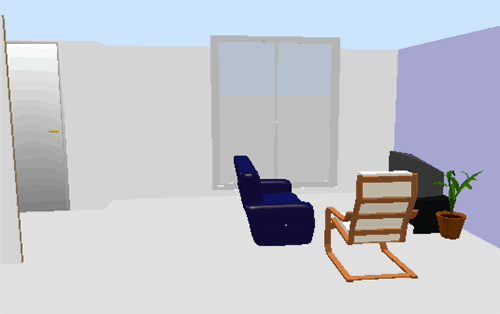
The above images are just some static screenshots. The best feature of the tool is it allows you to use your mouse and arrow keys to navigate/walk through the entire house as if you’re walking and looking around the house.
Please pardon my interior design skills, as I simply put this up within an hour.
To begin using the application, you will first need to upload a 2D floor plan just like what you see above.
Once uploaded, you will be required to define the scale of your floor plan.
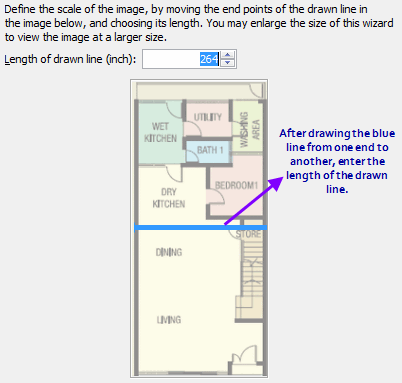
This setting ensures your 3D model scales to the actual width and length of the house.
Once done, you should see the Sweet Home 3D user interface.
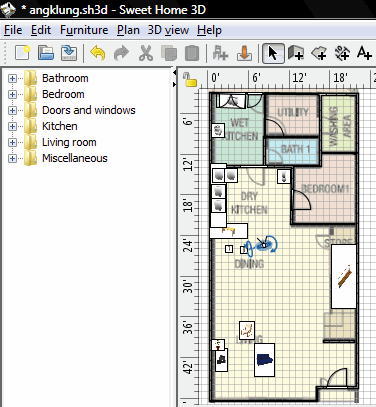
Notice that I have already placed some furniture. The left folders are a list of furniture and household items, which you can simply drag and drop into the floor plan.
At the bottom of the tool, you’ll see a 3D live preview just like the 3D screenshots above.
In order to see the 3D preview, you’ll first need to draw the walls along the lines of the 2D floor plan.

This Sweet Home 3D tutorial video shows you how to do it. I had to refer to it a couple of times to learn how to set up the walls and the rooms, after which adding and placing furniture was really simple.
If at any time you need additional designs of furniture, you can always click on the Import Furniture link to import new designs into the application.
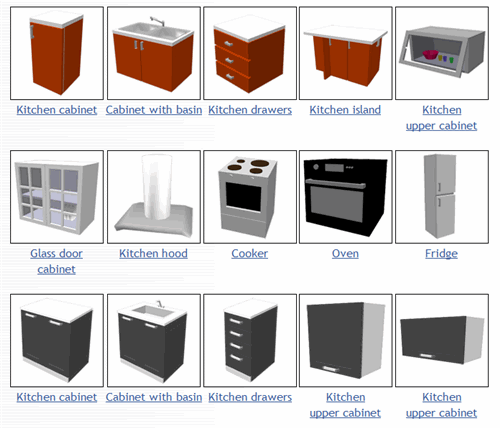
View all importable furniture
Sweet Home 3D is an open-source SourceForge.net project distributed under the GNU General Public License.
The software is available in 2 versions. A download version (Windows, Mac, Linux) and an online version (requires JavaScript and Java).
Sweet Home 3D: Good or Not?
If you are looking for software to design a house, room, or office space, you may come across Sweet Home 3D. At first look, it seems simple and friendly. It lets you draw your floor plan, put furniture inside, and see the design in 3D.
For many people, this is already very useful.
But like any software, it has good points and weak points. So let’s look at it in a simple way.
What is Sweet Home 3D?
Sweet Home 3D is a home design software. You can use it to draw walls, add doors and windows, place furniture, and view everything in 3D. It is made more for home users, beginners, students, and people who want to plan space easily.
It is not really for high-level professional architecture work. It is more for people who want to test ideas and see how a room or house may look.
The good things about Sweet Home 3D
1. Easy to understand
One of the best things about Sweet Home 3D is that it is easy to learn. You do not need to be an architect or designer to start using it. The layout is simple. You draw in 2D and at the same time you can see the result in 3D.
This is very helpful for beginners.
2. Good for planning room layout
If you want to know whether a table can fit in your dining room, or whether your sofa looks better near the wall or window, this software can help. You can move things around and test different ideas quickly.
This makes it useful for home planning and renovation ideas.
3. Good starting point for people with low budget
Another good point is that it is easier to access compared to many other design tools. For people who do not want to spend a lot at the beginning, this can be a good option.
4. You can still do many useful things
Even though it is simple, it still gives useful functions. You can create rooms, change furniture, adjust sizes, and make a visual plan of your home. For many normal users, this is already enough.
5. Helpful for visualizing ideas
Some people cannot imagine space well just by looking at a flat drawing. Sweet Home 3D helps because you can see your design in 3D. This makes it easier to understand how the room may look in real life.
The weak things about Sweet Home 3D
Now let’s be honest. The software is not perfect.
1. It can feel limited
If you want something very advanced, Sweet Home 3D may not be enough. It is fine for simple layout planning, but when you want more detailed design work, it starts to feel limited.
So if your goal is serious professional work, this may not be the right long-term tool.
2. The design and interface feel old
The software works, but it does not feel modern. The interface looks a bit old compared to newer tools. Some users may not mind this, but others may feel it is less attractive and less smooth.
3. Not the best for professional architects
This is important. Sweet Home 3D is not the same level as professional CAD or BIM software. If you need deep technical drawings, advanced building details, or professional documentation, this software is too basic.
It is better to see it as a practical home planner, not a full professional solution.
4. Rendering can take time
If you want better quality pictures or videos from your design, it may take longer to generate. So if you expect very fast and very realistic results, you may feel disappointed.
5. Free version may feel small
For some users, the free setup may feel enough. But for others, the furniture choices and textures may feel too limited unless they add more content.
So yes, it is usable, but it may not feel rich enough for everyone from the start.
So, is Sweet Home 3D worth using?
Yes, for the right person.
If you are a beginner, homeowner, student, or someone who just wants to plan a room or house layout, Sweet Home 3D can be a very good tool. It is simple, practical, and helps you see your ideas clearly.
But if you want advanced design power, very modern visuals, or professional-level architecture work, then this software may feel too basic.
Final thoughts
Sweet Home 3D is a useful software for simple home design and space planning. Its biggest strength is that it is easy to use. Its biggest weakness is that it has limits and does not feel very modern.
So the real answer is this:
Sweet Home 3D is good for simple planning, but not strong enough for serious professional work.
That does not make it bad. It just means you should use it for the right purpose.
For more info, check out Sweet Home 3D today!





Leave a Comment